What OAuth Token Refresh Failures Actually Look Like to End Users
Access tokens are short-lived on purpose. Typically they expire within an hour or two. That's a security design choice, not a mistake. The idea is that if a token gets intercepted, it goes stale quickly. Refresh tokens exist to bridge that gap so users don't have to log in every hour.
When your access token expires, the app quietly exchanges the refresh token in the background, gets a new access token, and keeps going. The user never sees any of this. When it works, it's genuinely elegant.
The refresh token itself has an expiration, and that expiration is deliberately never communicated to the client application. The reasoning is that there's nothing the client can actually do with that information in advance. It can't warn users. It can't pre-emptively refresh. It can only react after the failure already happened.
So an application that has silently refreshed its token a thousand times looks completely identical to one that has never had to. Everything looks healthy. And then it doesn't, all at once.
When the refresh finally fails, the only recovery is restarting the entire OAuth flow from scratch. That means a user has to get involved. The whole mechanism was built to be invisible, and that invisibility is exactly what makes the failure so disorienting when it arrives.
The symptoms users actually encounter when a refresh fails
There is no single universal error message; what the user sees depends on where in the stack the failure surfaces and how, or whether, the application bothers to handle it.
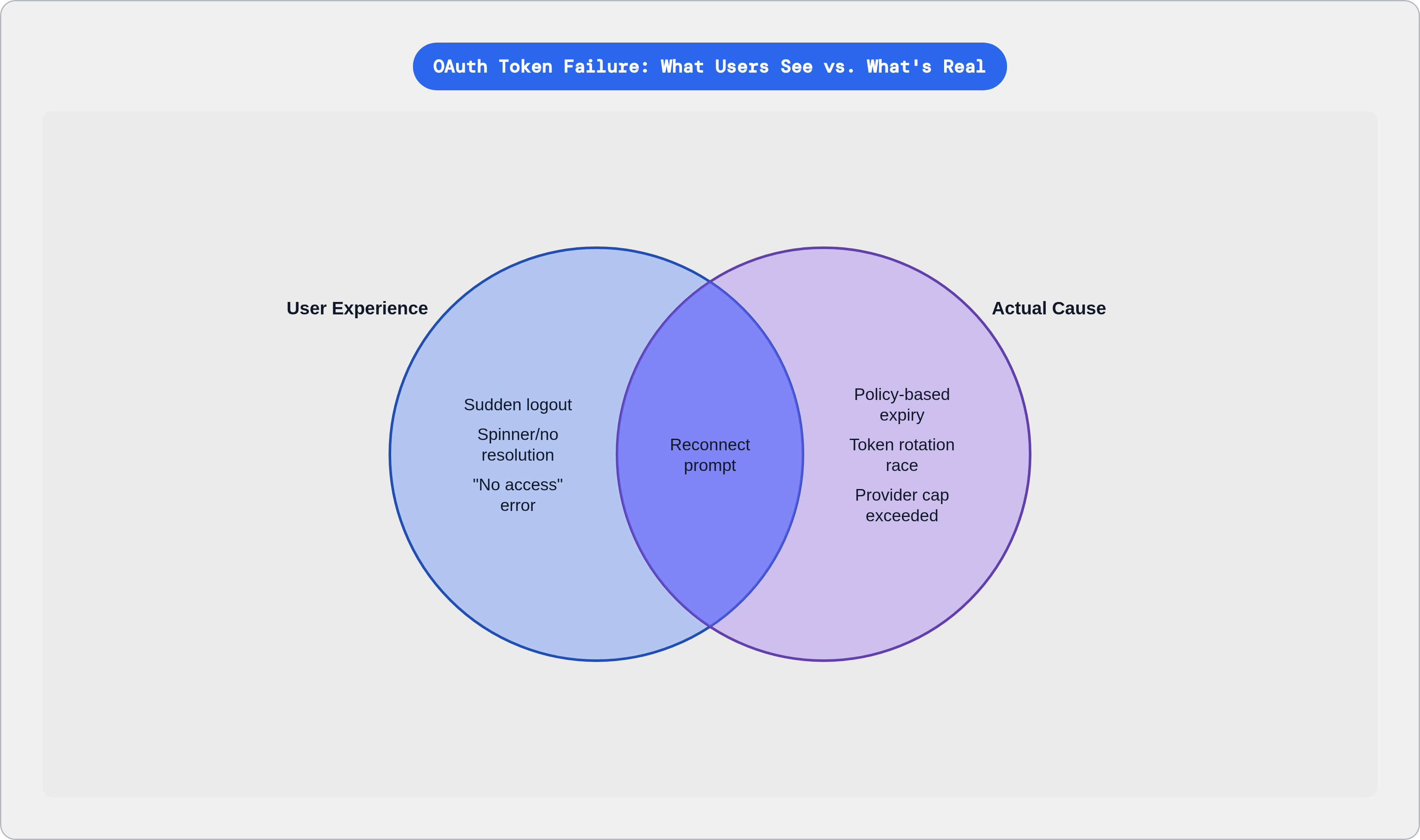
Users who were authenticated earlier in the day suddenly find themselves logged out with no explanation. No message says why. Their session didn't time out from inactivity. They didn't sign out. In the worst cases this hits many users at once, which looks exactly like an infrastructure outage. It isn't.
Background jobs are another casualty. They just stop running, with no visible error. The dashboard shows the integration as connected. Data stops arriving. The real-world version: a sync that ran flawlessly for months stops at its scheduled overnight run, and nobody notices until mid-morning when someone asks why yesterday's records are missing. The Microsoft Outlook OAuth node in n8n is a documented case of this; the token refresh silently fails after the access token expires, and all subsequent API calls fail without surfacing anything meaningful to the user.
Some integrations, particularly newer MCP-based ones, skip the refresh attempt entirely and fall straight through to a "needs reconnect" UI the moment the access token expires. The user clicks "Connect," the session restores in milliseconds, and the refresh token was never the problem. From the user's perspective, the app told them something was broken when nothing was.
For agentic or multi-step workflows, a refresh failure mid-execution doesn't pause gracefully. It crashes. Branches and tasks are left in partial states with no clean rollback. The user has to figure out what completed, what didn't, and whether partial results are even safe to use.
Some applications enter a retry loop: detect the failure, attempt the refresh, fail again, retry. They never escalate to a user-facing prompt to re-authenticate. The user watches a spinner, or sees repeated error notifications, with no resolution offered.
Then there are the failures that look like permission errors. HTTP 401 responses surface to users as "you don't have access." That's indistinguishable from a genuine permissions problem. Users assume an admin changed their role. Nobody suspects a credential that expired on a schedule they never knew existed.
The error messages developers see that users never do, and what gets lost in translation
The API errors are often specific; what reaches the user is almost always stripped of that specificity, and what reaches the developer is sometimes worse than nothing.
At the API layer, invalid_grant is the catch-all. It covers expired tokens, revoked tokens, reused tokens, and redirect URI mismatches, all under one label. It tells you something is wrong with the grant. It does not tell you which of four completely different problems you're dealing with.
The provider-specific versions aren't much better in practice:
- Salesforce surfaces
INVALIDSESSIONID, which masks the actual expiry behind a generic session error. - Microsoft Entra throws
AADSTS700082, which is specific to refresh token staleness from inactivity but is only meaningful if you already know the error code registry. - Power BI produces
DMTS_OAuthTokenRefreshFailedError, a descriptive name that appears nowhere in user-facing UI. Reports that refreshed daily for months just stop. invalid_tokenshows up in JSON responses andWWW-Authenticateheaders, generic enough to offer no remediation path.
Then there's what happens in the middleware layer. In n8n, when the token refresh fails, a serialization bug in the error-handling code itself crashes, producing TypeError: dummy.stack.replace is not a function instead of the actual OAuth error. The developer triaging the issue is now debugging a JavaScript error, not an authentication failure. The real cause disappears entirely and gets replaced by a symptom of the error handler.
That's the worst-case translation failure. And it's not hypothetical.
What users actually see is "Something went wrong." A silent failure. A reconnect prompt with no explanation.
This translation loss is what makes support expensive; users describe symptoms ("my data stopped syncing"), developers see middleware errors, the real cause is three layers down, and everyone is confidently looking in the wrong place, working back to the actual source in a process that reliably takes hours.
What actually causes the refresh token to stop working
The "worked-fine-yesterday" pattern is real; an integration runs without incident for months, then fails in a single instant at a policy boundary, without anything changing in the application code. That's what policy-based expiry looks like. Refresh tokens have a maximum lifetime set by the provider, and when that lifetime ends, the token is dead. No degradation, no warning, no predictive log entry.
The Salesforce case is worth knowing. Integrations provisioned before Spring 2021 inherited older refresh token policy defaults. Unless someone explicitly updated those policies, they carry them indefinitely. A years-old integration can hit a policy expiry that was set before the current team ever joined the company.
Admin and user actions silently revoke tokens too:
- Password changes in hybrid environments typically invalidate all active refresh tokens.
- MFA resets, security flag triggers, and consent changes can revoke tokens immediately.
- User deactivation is the quiet killer. If the account that originally authorized an integration gets deactivated during offboarding, every integration that ran under that account's token breaks simultaneously. The provider does not notify the application. All API calls simply begin returning errors.
One documented pattern: an IT consultancy lost OAuth access for multiple customer-facing integrations in a single morning when a former contractor's Salesforce account was deactivated. Routine offboarding cleanup.
Token rotation race conditions are their own category. When multiple processes share the same OAuth credentials and detect an expired access token at the same time, they all attempt to refresh simultaneously. With rotating refresh tokens, where the old token is invalidated the moment it's used, the losing processes try to refresh with a token that's already consumed. Some providers treat this as a replay attack and revoke the entire token family. The connection is permanently broken until the user manually re-authenticates. GitLab's webhook handling is a documented instance: high webhook volume can trigger simultaneous refresh attempts, each revoking the previous one.
Some integrations never attempt the refresh at all. Instead, they try a full browser-based OAuth flow when the access token expires, which fails silently in a non-interactive context. The application gives up on the session without telling anyone.
And Google silently invalidates the oldest refresh token when the per-user-per-client cap is exceeded. The common trigger is repeated re-authorization during testing, each of which generates a new token and quietly displaces an old one. Users whose tokens were displaced start receiving invalid_grant errors with no indication that a cap was ever involved.
How provider policies vary enough to make a single strategy insufficient
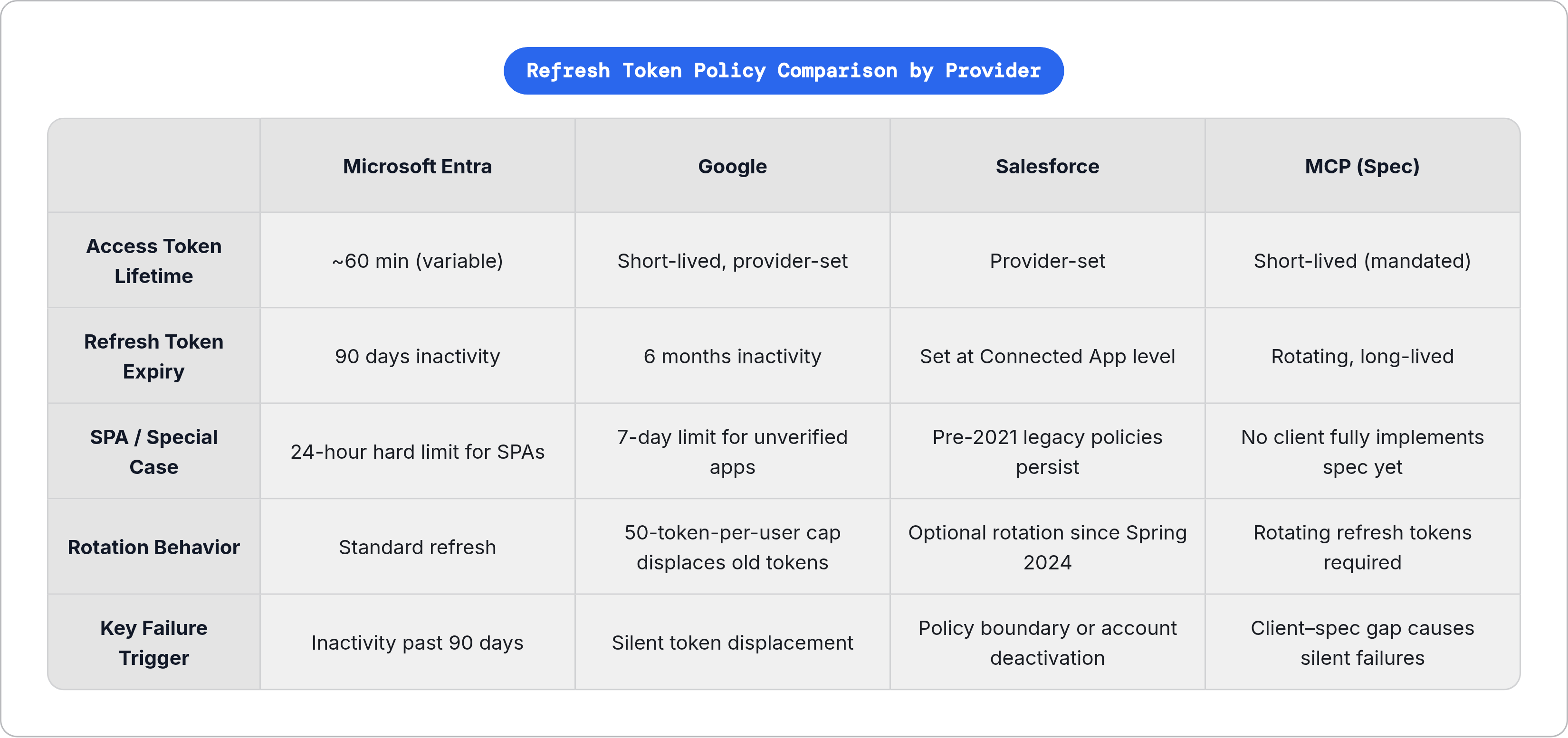
Every major provider sets its own refresh token lifetime, inactivity rules, and rotation behavior. There is no cross-provider standard for any of these. A strategy that works cleanly against one provider's token policy can silently fail against another's, and the providers are not coordinating with each other to make your life easier.
Microsoft Entra access tokens expire in a variable window averaging around sixty minutes. Refresh tokens are revoked after ninety days of inactivity by default. Single-page applications face much tighter constraints: refresh tokens for SPAs expire after just twenty-four hours regardless of activity, and each subsequent refresh token carries over that same expiration window. Apps built on SPA flows need to be prepared to re-run the full authorization flow daily.
Google production apps have no hard expiration on refresh tokens, but tokens are invalidated after six consecutive months of inactivity. "Used" means a successful token refresh call, not an API call made with the resulting access token. Apps in testing or unverified status face a hard seven-day expiration regardless of use. The fifty-token-per-user-per-client cap operates independently of lifetime; a token can be valid and unexpired and still be silently displaced.
Salesforce refresh token lifetime is determined at the Connected App level and has been historically variable. Spring 2024 introduced optional rotating refresh tokens, requiring applications to persist the new token returned on every refresh. If they don't, the integration fails after the first expiry cycle.
The MCP specification, finalized November 2024, mandates short-lived access tokens and rotating long-lived refresh tokens for remote server authentication. As of early 2026, no MCP client fully implements the specification. The gap between what the spec requires and what clients actually do is itself a source of failures for users of emerging agentic tooling.
Provider policy changes can turn a working integration into a broken one without a single line of application code changing. You cannot write your way out of this with a clever implementation. Each provider's rules are their own distinct case, and you have to treat them that way.
Why the timing of failures makes them so hard to attribute correctly
The cliff-edge failure pattern means there's no observable degradation before the break; the integration appears fully healthy until the exact moment it isn't. That alone makes attribution hard. The timing makes it harder.
Failures love off-hours. Scheduled syncs run overnight. Refresh token expirations hit at policy boundaries that don't align with business hours. The symptom, missing data, isn't discovered until hours later when someone looks for results that should have arrived.
The Salesforce and Marketo triage case illustrates the cost directly. A sync stopped at a policy boundary and triggered roughly six hours of investigation at the wrong layer, the Marketo connector, before anyone checked the Salesforce App Manager where the actual policy expiry was recorded. Six hours. Wrong layer. Completely confident the whole time.
The misattribution pattern is consistent across incidents like this:
- Users blame the product.
- Developers chase network or infrastructure issues first.
- Support teams log tickets about data freshness or sync reliability.
- The actual cause sits quietly at the bottom of the stack while everyone investigates everything above it.
A refresh token expiry is a small, invisible event; what it produces is a support ticket that takes hours to close, a workflow that has to be manually reconstructed, and a user who now trusts the integration a little less than they did yesterday. And it all started with a token expiring on a schedule nobody told you about.